
tiler-ts is a set of npm packages for building dashboards in TypeScript / Node.js — schema-first data, a 14-widget set, and a drag-and-drop editor. This site focuses on the Playwright story: how to surface your test runs as a tiler dashboard.
You have three options, increasing in commitment:
| Surface | What it gives you | When you'd pick it |
|---|---|---|
| Static reporter | A self-contained HTML dashboard generated at the end of every Playwright run. No server, no DB. | Solo / small teams. CI artifact. Open with file://. |
| Live server | A long-running Fastify server with sqlite + WebSocket live updates, ingesting from your test runs. | Teams who want history across runs and a TV in the office. |
tiler import-playwright-json | One-shot conversion of an existing Playwright JSON report into ingest records, either to disk or HMAC-POSTed to a server. | Bridge mode — keep the default Playwright reporter, fan results out to a tiler server. |
Pick one to start; you can switch later without losing your test history if you ingest into the same data source slug.
What you'll see
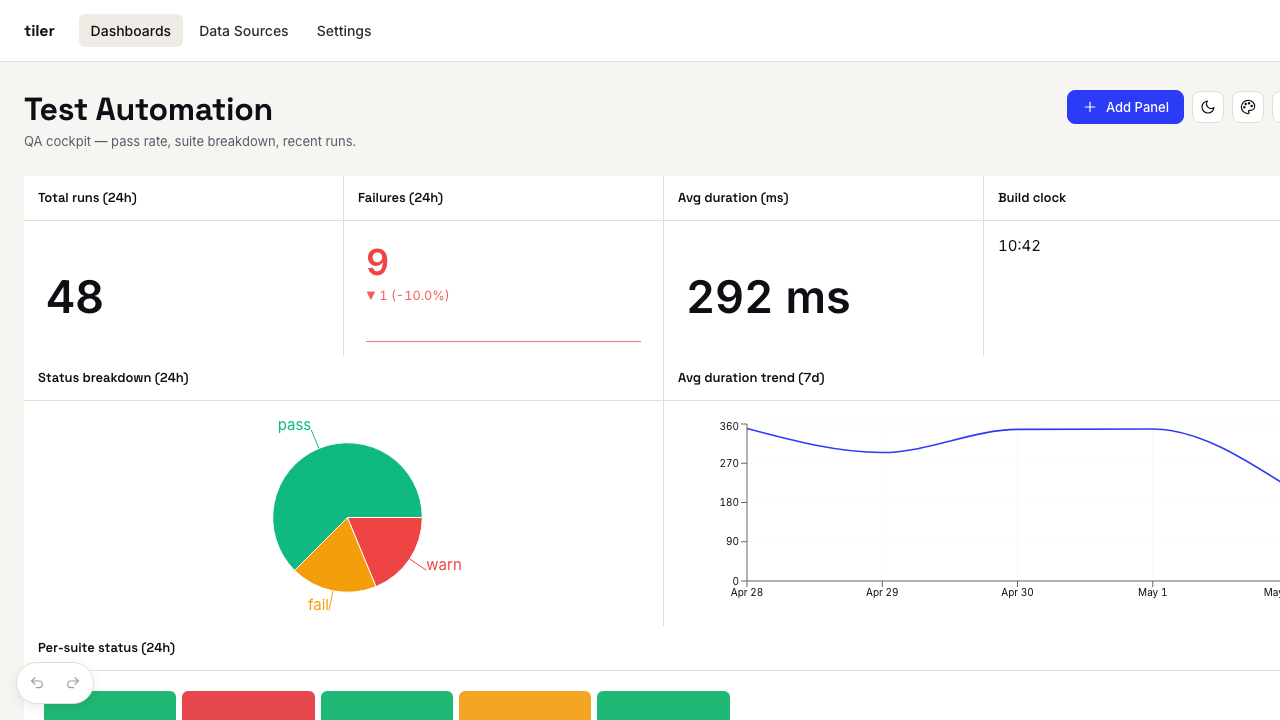
Whichever surface you pick, the dashboard ships with the test_automation preset: a curated set of nine panels driven by a test_runs data source whose records carry suite, test_name, status, duration_ms, and environment.
Headline panels:
- Total runs (24h) — a single big number.
- Failures (24h) — number with a sparkline + WoW delta.
- Avg duration (ms) — metric with unit.
- Status breakdown (24h) — pie chart.
- Avg duration trend (7d) — line chart.
- Per-suite status (24h) — status grid (one cell per suite).
- Failures by suite (24h) — bar chart.
- Recent failures (24h) — table of the last failed runs.
Each panel is a regular tiler widget — see the widgets tour for what else is in the set.
Mental model
flowchart LR
  PW[Playwright run] -->|reporter| HTML[Static report HTML]
  PW -->|JSON| CLI[tiler import-playwright-json]
  CLI -->|HMAC POST| TS[(tiler-ts server)]
  PW -->|HMAC webhook| TS
  TS -->|SSR + WebSocket| Browser
Every flow ultimately produces records that match the test_runs schema. The widgets resolve those records into the visible panels — which means a custom widget you write once works in all three surfaces.